 Woolshed
Server: is it up?
Tell Woolshed where a project runs, and it checks the site, disk and services while the window is open, and tells you when something goes down.
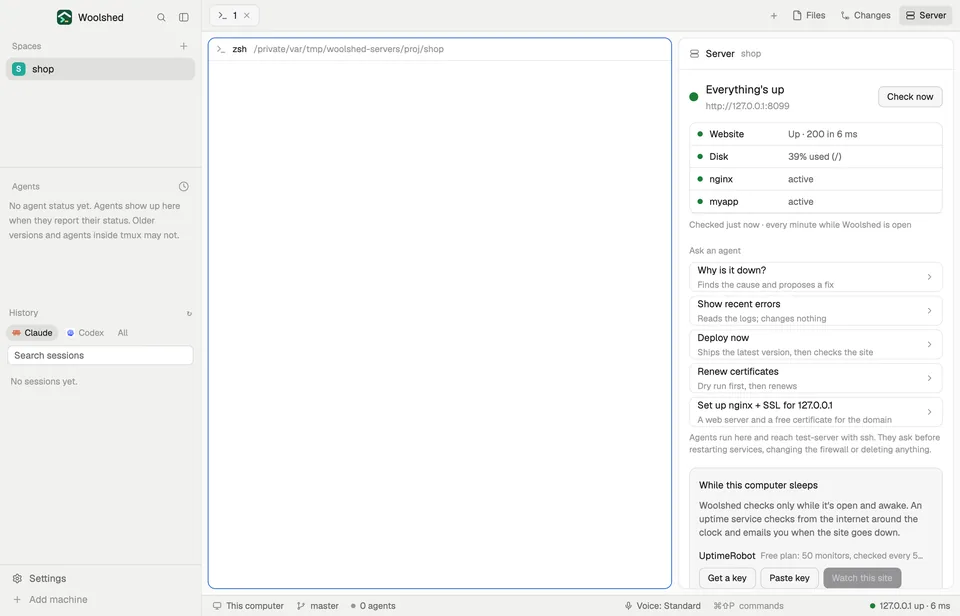
server is the side panel's Server: per project (the shown space's repo top, else its folder, on its machine) it keeps the website address, where it runs and how it deploys, in shared "server.sites" keyed "<machine or empty>:<folder>": { name, url, target: {machine} | {ssh} | null, deploy: "ssh" | "ci", ci, services: [...], uptime? }. Never put secrets there. target.machine is a Woolshed machine (hc machine ls: Woolshed Core runs there); target.ssh is a plain ssh-config host with nothing installed (SSH only, the choice for production servers); null is hosting nobody logs in to (only the site is checked).
- Checks, while Woolshed is open, by whichever copy (the panel or the status bar's) gets there first: the site every minute (
curl -sS -v -L: status, time, and the certificate's expiry from its "expire date";openssl s_clientwhere curl doesn't print it), and every 5 minutes over ssh (or the machine) the disk (df -P /) and each service'ssystemctl is-active. Results are shared"server.health"per project. A new problem posts a toast (its actionserver.openshows the panel), plays the blocked sound and, with the window in the background, the system's notification; all clear again posts "back up". Commands:server.open(the panel),server.setup(the panel, with the shown project's form open),server.check(every project now). - Jobs start an agent (the first installed, as the start screen lists them) in a tab with a prompt: Why is it down?, Show recent errors (read only), Deploy now (in the project's own space; CI: through the workflow), Renew certificates (dry run first), Set up nginx + SSL for the domain (checks DNS first). On a Woolshed machine with an agent installed they run there, in a space of that machine; otherwise here, reaching the server with
ssh <host>orhc exec --on <machine>. Every prompt says the server is live and has the agent ask before restarting or stopping a service, changing a firewall, deleting or overwriting anything, or installing packages. Start an agent whenever it goes down opens the Automations form for the site (below): Woolshed Core checks it every 5 minutes, window open or not. - Uptime while this computer sleeps: UptimeRobot (API v3
POST /v3/monitors, v2newMonitoras fallback) or Better Stack (POST /api/v2/monitors). Get a key opens their page; Paste key opens a small terminal where the key goes straight into the Keychain (security add-generic-password -s woolshed.uptime.<provider>; Linux:secret-tool), never through Woolshed; Watch this site reads it from there once and makes the monitor. The monitor's id is kept as the site'suptime.
Your agents read these same words: Woolshed writes this guide to ~/.config/woolshed/AGENTS.md on every start. In it, “you” is the agent and “the person” is you.