 Woolshed
The gallery
The gallery is where people share layouts and mods. Give your agent an item's address and it adds it beside yours, without overwriting anything.
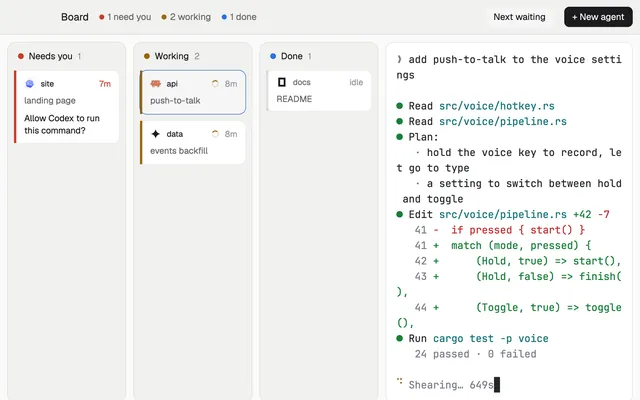
https://woolshed.dev/gallery/ is where people share layouts and mods, and where Woolshed puts more of its own. Each one is a folder laid out like this home: a layout has layouts/<name>.json and the mods/<name>/ it needs; a mod is a piece for the person's own window, so it has only mods/<name>/ (main.js, maybe mod.json and its assets) and maybe a keys.json with the keys it expects. Both have a RECIPE.md (the brief to build it from scratch) and a preview.png. The files are one build of the recipe.
The person can also browse it inside Woolshed: the Gallery (mod.open:gallery, or Gallery… in the menu) shows every item with its picture and recipe, and adds one with a click by the rules below: every file downloaded under data/gallery/staging/ and read first, what its code reaches for shown before adding, a taken name renamed everywhere it's used, keys merged without replacing one in use, nothing overwritten.
To find one, read https://woolshed.dev/gallery/index.json: { "schemaVersion": 1, "generatedAt", "items": [{ "kind", "owner", "name", "title", "blurb", "page", "manifest", "preview", "stars", "updated" }] }. Offer the person a few by title and blurb, with their page.
woolshed check <folder> on such a folder (no main.js of its own: one you downloaded, or one you're about to publish) checks the whole package: each layout (the window reads it, and every mod it names is in the package or ships with Woolshed), its keys.json, and each mod.
Add a layout or mod
Asked to add one, get its files from the address you're given into a new, empty folder outside this home (a folder in mods/ can start running as soon as it lands there):
- A gallery page,
woolshed.dev/gallery/layouts/<owner>/<name>orwoolshed.dev/gallery/mods/<owner>/<name>(with or withouthttps://and the last/). Read its manifest, the same address plus/manifest.json:{ "kind": "layout" | "mod", "owner", "name", "title", "blurb", "source": { "type": "woolshed" | "github", "repo", "commit", "path" }, "base", "files": ["RECIPE.md", "preview.png", "layouts/<name>.json", "mods/<name>/main.js", ...] }. Download every path infilesfrombasefollowed by the path, keeping the paths. Stop if a path is absolute or contains... - A GitHub folder,
github.com/<owner>/<repo>/tree/<ref>/<path>, or a whole repository,github.com/<owner>/<repo>: download the repository at<ref>(else its default branch) withgit cloneor ashttps://github.com/<owner>/<repo>/archive/<ref>.tar.gz, and use<path>in it.
Then:
- Read
RECIPE.mdand every file before writing anything. Before adding, tell the person if a mod reaches the network, runs programs (exec,hc) or reads files outside its own folder. - Never overwrite: if a layout or mod name is taken (the person's or Woolshed's), first rename the new one in the downloaded folder (letters, digits,
-and_) everywhere it's used: its file or folder; themodnames in the layout (blocks, pane headers, floating blocks,terminal_menu) and wherever the code names it (openOverlay,mod.open,pane.split,tab.new); its asset paths (mods/<name>/..., the layout'spreview); and in itskeys.json, thelayout:<name>ormod:<name>section and<name>.<command>actions. Then copy the layout file tolayouts/and each mod folder tomods/, leaving the recipe and preview out. - Fit it to this setup only where its assumptions don't hold (a missing program, a name clash) or the person asks. Where its files name a different command or home folder for the window, use
woolshedand~/.config/woolshed(WOOLSHED_HOME). If the files don't work on this version, or the person wants it different, build it from the recipe instead. - A
keys.json: merge it into the person's. Add its sections and keys, and ask before replacing a key they already use. woolshed check ~/.config/woolshed/mods/<name>for each mod you added; for a layout, thenwoolshed do layout.switch --name <name>. The person's own layout stays as it was;ctrl-shift-lswitches back, and deleting the files removes it.
Publish to the gallery
Publishing makes the person's files public: do it only with their go-ahead.
- Make a new folder laid out as above: for a layout,
layouts/<name>.json(and itspreviewpicture, if it has one) and eachmods/<name>/it uses that doesn't ship with Woolshed; for a mod,mods/<name>/and, if it expects keys, akeys.jsonwith only those. Clicks (layouts/.state/) don't travel: write any the look depends on (a size, a theme) into the layout file. Leave out the person's own files (settings.json,shared.json,data/,view.json) and anything private in the code (tokens, host names, paths); ask if unsure. - Write its
RECIPE.mdfrom the real files (below), with the sections What you see, How it behaves, Built from, Watch out and Done when. - Show it in the window (
woolshed do layout.switch --name <name>, or the mod on screen) and savewoolshed shot <folder>/preview.png. The picture is what's on screen, terminals included: look at it, and show it to the person before it goes public. woolshed check <folder>; fix what it reports until it passes.- Push the folder to a public GitHub repository (one folder per layout or mod if it holds several) and give the repository the topic
woolshed-layoutfor a layout orwoolshed-modfor a mod. Withgh, in the folder:git initand commit it, thengh repo create <repo> --public --source . --pushandgh repo edit --add-topic <topic>. The gallery lists repositories with these topics. Give the person its address,github.com/<owner>/<repo>(.../tree/<branch>/<folder>for a folder in it): anyone can add it from there.
RECIPE.md
A RECIPE.md is a brief: another agent with an empty folder builds the layout or mod from it. Write it from the real files, in this order:
# Name, one paragraph of what the person sees,.- What you see: the regions top to bottom or left to right, their sizes, colors and type; what each one shows.
- How it behaves: every agent status (working, blocked, done, idle) and how it looks; what clicks, keys and hovers do; what moves.
- Built from: the layout's node tree and blocks, each mod and its
propsroles, the shipped mods it uses, thewoolshedfunctions and commands it calls, any programs it runs, its art. - Watch out: what tripped the build up and what a fresh build would get wrong; limits (sizes, counts); controls that do nothing yet; what it assumes about the setup.
- Done when: checks that prove a build works, each one something the build really does.
The person and what they see come first; code only in Built from and Watch out. Exact over vague (#ab7748, 29px, agent.focus), and nothing the build doesn't do.
Your agents read these same words: Woolshed writes this guide to ~/.config/woolshed/AGENTS.md on every start. In it, “you” is the agent and “the person” is you.