 Woolshed
Device pane and new apps
The Device pane shows a simulator or emulator beside the agent building for it, and New app starts a SwiftUI, Expo or Jetpack Compose project with the tools checked.
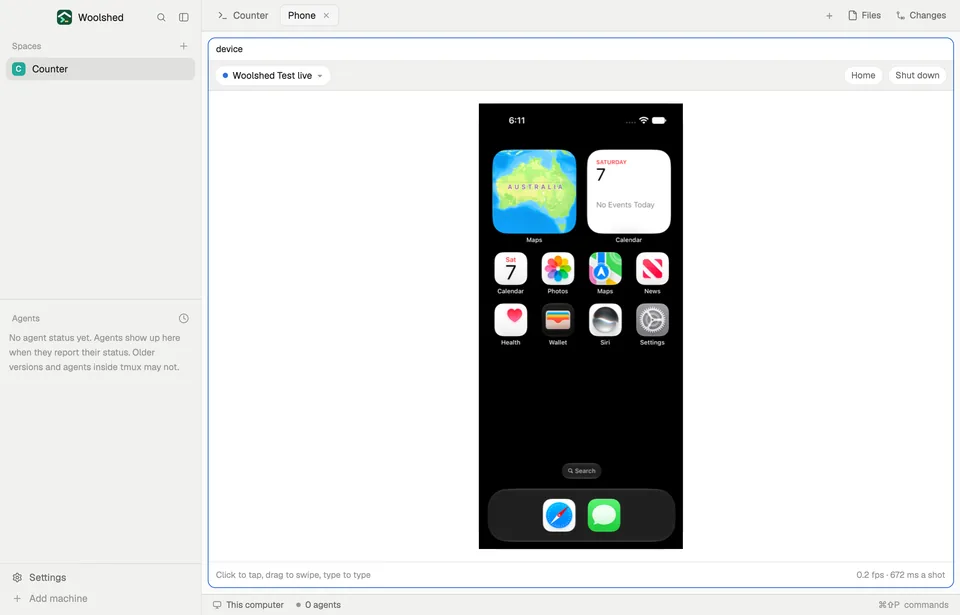
device is a pane that shows a simulator's or emulator's screen and passes input to it: pick a device (iOS simulators from xcrun simctl, Android emulators from emulator -list-avds, phones from adb devices), Boot it (headless: the pane is its screen), Install & open (the newest build in the pane's folder: a *-iphonesimulator/*.app or a debug .apk), Home, Back (Android), Shut down. A click is a tap, a drag a swipe, typing goes to the focused field. The screen is a screenshot taken again as soon as the last one is in (a picture, not video: about 1 to 4 a second, slower when nothing changes; a screen that hasn't changed isn't drawn again); the footer shows the rate. It holds one frame in memory (a live image). iOS taps and typing need idb (brew install facebook/fb/idb-companion && pip3 install fb-idb: the footer offers it); simctl has no input of its own. macOS and Linux.
- Props:
{ device?, folder?, boot? }:deviceisios:<udid>,android:<avd>oradb:<serial>;boot: truestarts it. Open it:woolshed do pane.split --direction right --mod device --props '{"device":"ios:<udid>","folder":"/path/to/app"}'. It's focusable. - Agents use the same device with its helper,
mods/device/device.sh(no device: the one the pane shows, kept indata/device/current):list,boot,shot [dev] [out.png](prints the path),tap x yandswipe x1 y1 x2 y2 [ms](in the screenshot's pixels),type text,key home|back|enter|delete|lock,install path,launch <bundle id | package>,run <folder>(install the newest build there and open it),ui(the accessibility tree, as idb or uiautomator give it),doctor(which toolchains are installed):sh ~/.config/woolshed/mods/device/device.sh shot. - Find and tap by what's on screen instead of guessing pixels:
elements(one element a line:button "Sign in" [x y w h], in the screenshot's pixels),find <text>(the middle of the element whose label is that text, else the first that contains it),tap-on <text>(taps it) andwait <text> [seconds](until it's on screen; default 10). iOS needs idb for these, as for taps. The pane marks each tap for a moment, an agent's too, so the person sees what you did. - New app (the start screen's New app…, the
new-appdialog): SwiftUI (iPhone and iPad; macOS), Expo (iPhone and Android) or Jetpack Compose (Android). It checks that kind's tools (device.sh doctor), offers Install for each one missing (mods/new-app/setup.sh <tool>in a tab: Xcode, the iOS simulator, idb, Node, Android Studio, the emulator, a virtual device), then makes a space for<folder>/<Name>whose first terminal runsmods/new-app/scaffold.sh(the template, anAGENTS.mdsaying how to build, run and check it, a git commit) and becomes the picked agent with a prompt to build it, and opens the Device pane beside it, booting the device. Shared"new-app.parent"and"new-app.kind"keep the last folder and kind.
Your agents read these same words: Woolshed writes this guide to ~/.config/woolshed/AGENTS.md on every start. In it, “you” is the agent and “the person” is you.